
If you’ve ever wanted to save a thumbnail from a YouTube video but didn’t know how, the Pixellize YouTube Thumbnail Downloader makes it incredibly easy. No apps, no extensions, no confusing steps—just paste a link and get the thumbnail instantly.
Whether you’re a content creator, a designer, or someone who needs thumbnails for projects or presentations, this tool gives you quick access to high-quality YouTube thumbnails for free.
What Is Pixellize YouTube Thumbnail Downloader?
Pixellize’s YouTube Thumbnail Downloader is a free online tool that lets you download any YouTube video thumbnail in Full HD, HD, SD, and small sizes. The tool supports YouTube videos in HD, HQ, 1080p, and 4K, making it perfect for designers and editors who need high-resolution images.
You can download thumbnails in the following sizes:
- HD Image (1280 × 720)
- SD Image (640 × 480)
- Normal Image (480 × 360)
- Normal Image (320 × 180)
- Normal Image (120 × 90)
Just grab the link, paste it, and download whichever size you need.
How to Use This YouTube Thumbnail Downloader
Using this tool is super simple. Here’s how it works:
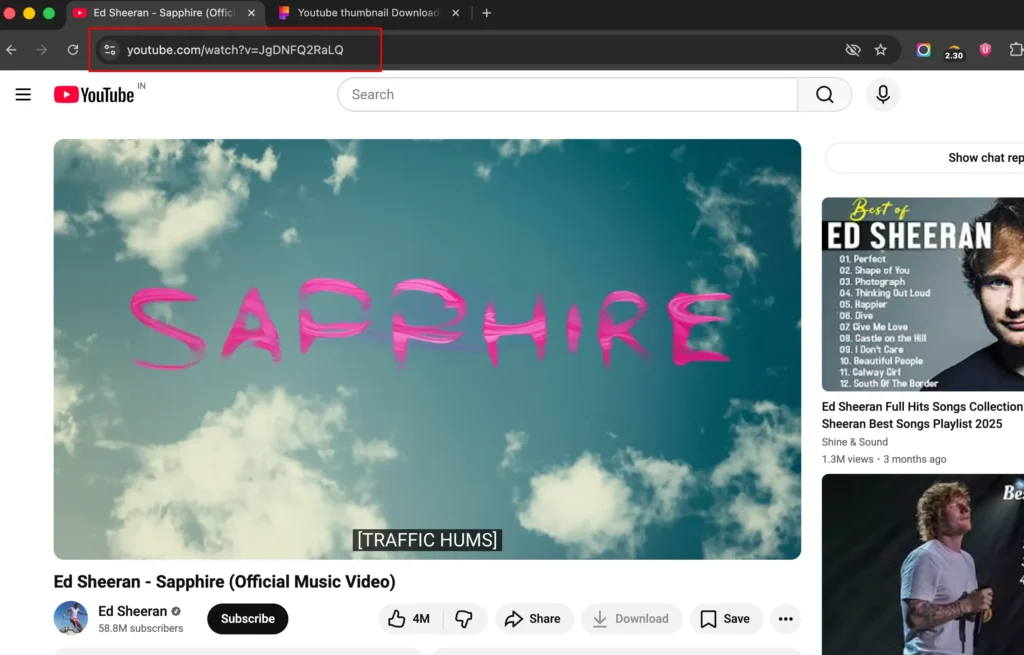
1. Copy the YouTube Video URL
Open the video on YouTube and copy the link from the address bar or the share button.
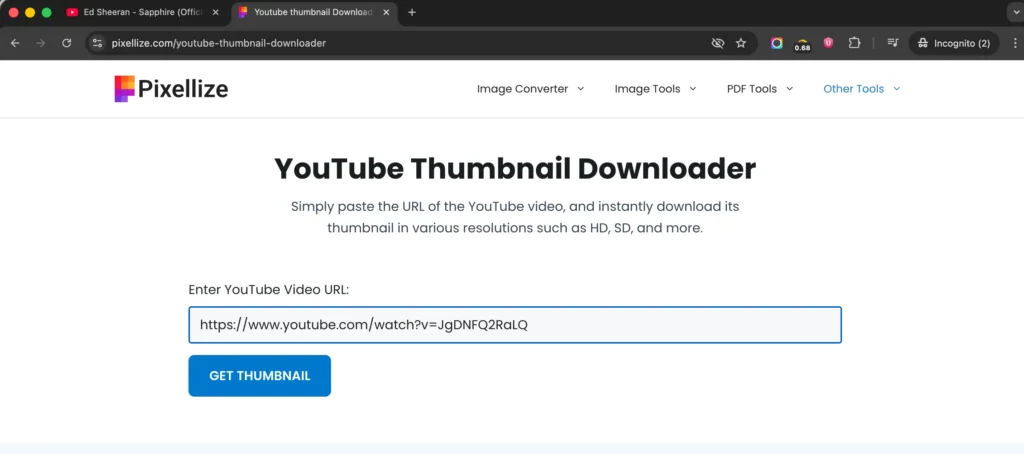
2. Paste the Link on Pixellize
Visit the Pixellize YouTube Thumbnail Downloader page and paste the link into the input box.
Within seconds, the tool will fetch the thumbnail in multiple resolutions.
3. Download the Thumbnail
Choose the size you want and click the download button.
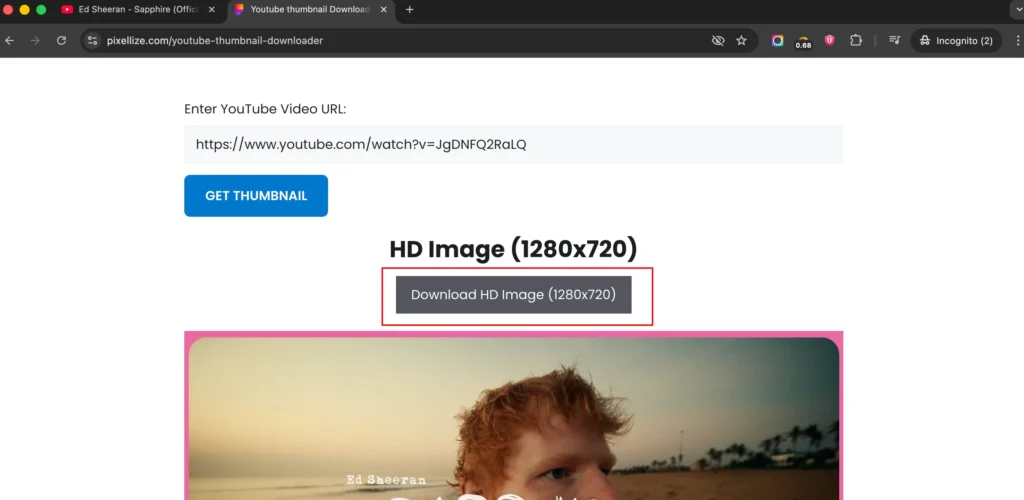
That’s it—your thumbnail is downloaded instantly.
Why Use a YouTube Thumbnail Downloader?
A tool like this is helpful for many reasons:
- Creating graphics or animations
- School and office presentations
- Thumbnail redesigning
- Social media content
- Photoshop or editing practice
- Brand mockups or sample designs
- Blog or website graphics
Creatives and content creators often need inspiration or reference images, and this downloader provides exactly that.
Is It Legal to Download YouTube Thumbnails?
Yes, it is 100% legal to download thumbnails from YouTube.
But keep this in mind:
- Thumbnails are copyrighted material
- Downloading is fine
- Reusing publicly may require permission from the video owner
For private or educational use, there’s no issue at all.
Device Compatibility
The Pixellize YouTube Thumbnail Downloader works smoothly on almost all devices:
- Android phones
- Windows laptops
- MacBooks
- Tablets
- Desktop computers
Note: iPhones may block image downloads unless the device is jailbroken due to Apple’s security restrictions.
Are There Copyright Risks?
The thumbnails you download belong to the original video creator.
You may face copyright issues only if:
- You upload the same thumbnail back on YouTube
- You use it commercially without permission
- You claim the design as your own
For personal use, editing practice, presentations, and website design, the risk is very low.
Are Reused YouTube Thumbnails SEO-Friendly?
No, they are not SEO-friendly.
Search engines like Google can detect duplicate images easily.
To make your thumbnail SEO-friendly, you can:
- Add text
- Apply filters or color changes
- Crop or resize
- Redesign the layout
- Add icons or graphics
This helps you create a unique thumbnail that performs better online.
Final Thoughts
The Pixellize YouTube Thumbnail Downloader is one of the fastest and most reliable tools for downloading YouTube thumbnails in HD and 4K quality. It’s simple, free, and works instantly—making it perfect for creators, designers, students, and anyone who needs high-quality YouTube images.
Try it here: https://pixellize.com/youtube-thumbnail-downloader

Pixellize
We're Pixellize Team, a group of digital creators and developers who are passionate about developing free online tools that can be easily utilized by everyone. We also share tips on working smarter and faster!
Related Post
Online PDF Reader – View and Read PDFs Instantly
In today’s fast-moving digital world, PDFs are everywhere — from office documents and study materials to invoices, resumes, and eBooks....
Pixellize
February 22, 2026
5 Min Read
How to Rotate PDF Pages Online (Step-by-Step Guide)
PDF files are great for sharing documents, but sometimes pages don’t appear the way they should. You might open a...
Pixellize
January 4, 2026
4 Min Read
How to Resize Signature Images to 20KB & 50KB
If you have ever tried to fill out a government job application, a visa form, or a college registration, you’ve...
Pixellize
December 31, 2025
4 Min Read