
We’ve all been there. You plan the perfect webinar, schedule a critical client call, or organize an online workshop. You send out the email, post on social media, and wait. Then, the event time rolls around, and… crickets. Half the people who registered are nowhere to be seen.
Why? Often, the reason is painfully simple: they forgot. Your email got buried. They meant to add it to their calendar but got distracted. In our fast-paced digital world, if it’s not on the calendar, it doesn’t exist.
This is where a small but mighty tool comes in: the Calendar Link Generator. It’s the simple, professional solution to ensure your events get the attention (and attendance) they deserve.
Today, we’re diving deep into what this tool is, why it’s a game-changer for absolutely everyone, and how you can use the free Pixellize Calendar Link Generator to create one-click calendar invites in seconds.
What is a Calendar Link Generator?
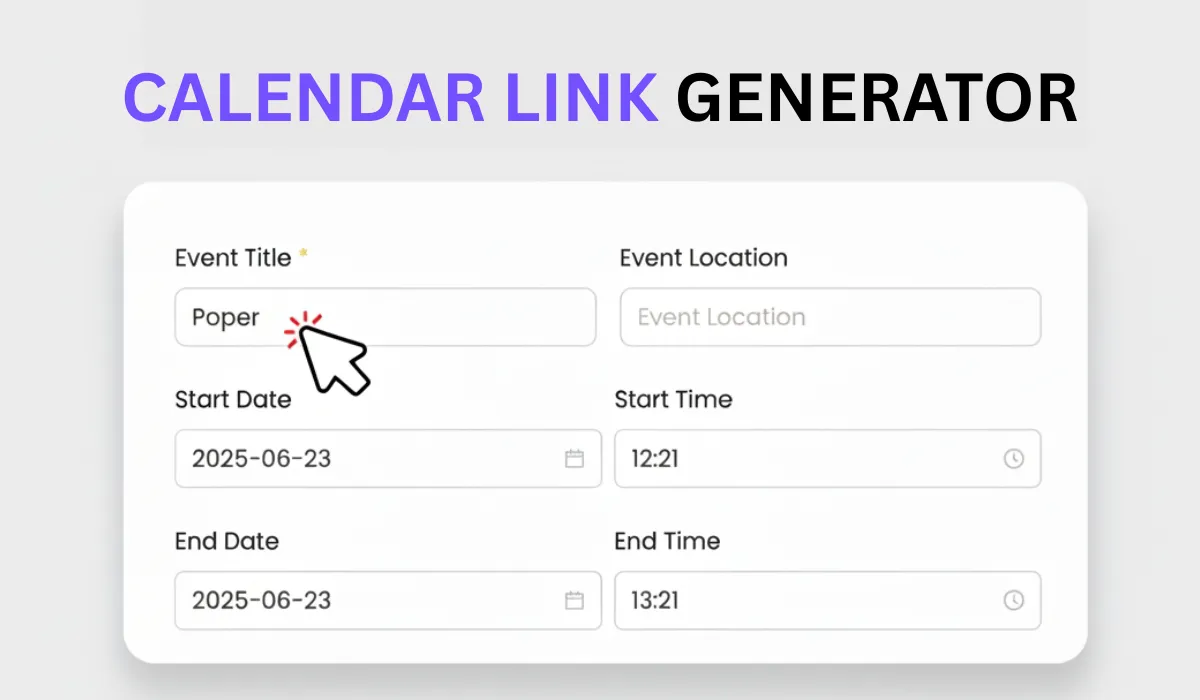
In simple terms, a Calendar Link Generator is a tool that takes your event details—like the title, date, time, and location—and turns them into a set of universal “Add to Calendar” links.
Instead of just telling someone about your event, you’re giving them a button to instantly save it to their preferred calendar, whether that’s Google, Outlook, Apple, or something else. It removes all the friction, making it ridiculously easy for your audience to remember you.
This isn’t just a gimmick; it’s a vital tool for:
- Marketers: Boosting attendance rates for webinars, product launches, and live events.
- Sales Professionals: Reducing no-shows for demos and client calls.
- Event Organizers: Ensuring attendees for workshops, community gatherings, and conferences have the right details.
- HR & Recruiters: Simplifying the scheduling of interviews and onboarding sessions.
- Educators: Making sure students don’t miss online classes or submission deadlines.
Essentially, if you ever need someone to be somewhere at a specific time (virtually or physically), this tool is for you.
Why Use a Calendar Link Generator? (It’s More Than Just a Link)
You might be thinking, “Can’t people just create their own event?” They can, but they often won’t. A Calendar Link Generator bridges the gap between intention and action.
Here are the biggest benefits:
- Dramatically Boosts Event Attendance: This is the big one. When an event is on someone’s calendar, they get reminders. They plan their day around it. It becomes a concrete commitment, not a vague intention.
- Saves Everyone Time: You save time by not having to manually create and email .ics files. Your attendees save time by not having to manually type in your event title, copy-paste the Zoom link, and double-check the time zone. It’s one click. Done.
- Eliminates Manual Errors: Ever had someone show up an hour late because they got the time zone wrong? Or go to the wrong virtual meeting room? A schedule meeting link generator embeds all the correct information directly into the event. No typos, no confusion.
- Looks Incredibly Professional: Sending an email with a simple “Add to Calendar” button shows you’re organized, efficient, and respect your audience’s time. It’s a small touch that leaves a big, positive impression.
- Increases Your Reach: The links are shareable everywhere. Put them on your website, in your email signature, on your “Thank You” page after a form fill, or even in a social media bio.
How to Use the Pixellize Calendar Link Generator (Step-by-Step)
We designed our tool at Pixellize to be the fastest and simplest on the web. You can create calendar invite links in under a minute, with no login required.
Here’s how easy it is:
- Navigate to the Tool: Head over to the Calendar Link Generator.
- Fill in Your Event Details: You’ll see a simple form. Let’s break down each field.
- Event Title: Be clear and descriptive.
- Bad Example: “Meeting”
- Good Example: “Q4 Marketing Strategy Webinar” or “Discovery Call: Your Brand + Pixellize”
- Date & Time: Select your event’s start and end date and time. Pay close attention to AM/PM! The tool will handle the time zone conversions for your users.
- Location: This field is flexible.
- For virtual events, paste your full meeting URL (e.g., https://zoom.us/j/123… or https://meet.google.com/…).
- For physical events, type in the full street address.
- Description: This is your secret weapon! Don’t leave it blank. This info gets saved directly into your user’s calendar event. Include things like:
- A brief agenda
- The meeting link (again, for easy access)
- Any login details or passcodes
- A link to “What to expect” or “How to prepare”
- Your contact information
- Event Title: Be clear and descriptive.
- Generate Your Links: Once you’ve filled in the fields, click the “Generate Links” button.
- Copy and Share! Instantly, the tool will provide you with:
- A set of direct links for Google, Outlook, Office 365, and Apple.
- Ready-to-use HTML code for an “Add to Calendar” button you can embed on your website or in an email template.
That’s it. You’re ready to share your event with the world.
Supported Calendar Platforms: One Link to Rule Them All
The biggest headache with scheduling is platform diversity. Your client uses Outlook, your designer is on Apple Calendar, and your new hire lives in Google Calendar.
A good Calendar Link Generator solves this. The Pixellize tool generates links that are compatible with all major calendar services:
- Google Calendar: The most popular web-based calendar. This link will open a pre-filled “Create Event” page in their Google account.
- Outlook: The standard for many corporations. This generates an Outlook calendar URL for the web version.
- Office 365: The cloud-based version of Outlook, also fully supported.
- Apple Calendar: This will download a universal .ics file, which is the standard format that Apple Calendar (on iPhone, iPad, and Mac) opens automatically. This file also works with most other desktop calendar apps.
You no longer have to guess what platform your audience uses. You can either provide all the links and let them choose, or use the slick add to calendar button that reveals all the options in a clean dropdown.
Use Cases & Examples: Where Can You Use These Links?
The applications are endless. Here are a few real-life examples to get you started:
Webinar Confirmation Emails:
- Before: “Thanks for registering for our webinar on [Date] at [Time].”
- After: “Thanks for registering! [Click here to add this event to your calendar] so you don’t miss it.”
“Book a Demo” Thank You Pages:
- After someone fills out your contact form, don’t just say “We’ll be in touch.”
- Show them a confirmation page that says, “Your demo is booked! [Add to Google Calendar] [Add to Outlook]“
Client Onboarding: Send a welcome email with links for all your scheduled kick-off and check-in calls. It sets a professional, organized tone from day one.
Product Launch Announcements: Building hype for a big release? Include a calendar link in your email and social media posts so your fans can set a reminder for launch day.
Online Course Schedules: If you run a cohort-based course, provide “add to calendar” links for every live session, Q&A, and deadline.
The Bigger Picture: Automation, Productivity, and Professionalism
Using a calendar link generator isn’t just a one-off trick. It’s a step towards better automation and a more professional workflow.
Every manual task you eliminate—like answering “What time was that meeting again?”—is a win for your productivity. When you automate the small, administrative parts of your job, you free up mental energy for the work that actually matters.
This tool is a key part of a seamless user experience. The journey from “interested” to “attending” becomes frictionless. That’s not just good service; it’s smart business.
Why Choose Pixellize’s Calendar Link Generator?
A quick search will show you there are other tools out there. Many are clunky, require you to create an account, or are hidden behind a paywall.
We built ours with a simple philosophy: it should be fast, free, and easy.
- Absolute Simplicity: The interface is clean and intuitive. There are no confusing settings or “pro” features to unlock. It just works.
- No Login or Sign-Up Required: We don’t need your email address. We don’t need your name. Just visit the page, create your link, and get on with your day.
- Instant Link Creation: The tool is blazingly fast. You’ll have your links before you can even think about opening your own calendar app.
- 100% Free, Forever: This isn’t a free trial. It’s a free tool. We built it to be helpful for the community, from small business owners to non-profit organizers.
Conclusion: Stop Chasing, Start Scheduling
Managing events and meetings doesn’t have to be a mess of back-and-forth emails and calendar tag. A free Calendar Link Generator is the simplest, most effective way to get your event from an email inbox onto someone’s actual schedule.
You’ll boost your attendance rates, save yourself (and your audience) valuable time, and look more professional with every invite you send. Stop wondering if they’ll show up. Ensure they do.
Ready to simplify your event planning?
Try the Pixellize Calendar Link Generator for free now!
And while you’re there, check out all the other simple, powerful web utilities we’re building on the Pixellize home page.
Frequently Asked Questions
Is the Pixellize Calendar Link Generator truly free, and do I need to register?
Yes, absolutely. The Pixellize Calendar Link Generator is 100% free to use, with no hidden fees or limitations. We also believe in simplicity and speed, which is why no login, registration, or email sign-up is required. You can visit the site, generate your links instantly, and start sharing them immediately.
Will the calendar link work for different time zones?
Yes, this is one of the biggest benefits! When you create an event using the Pixellize tool, you input the event time in your local time zone. When a user clicks the generated link, their calendar application (like Google Calendar or Outlook) is intelligent enough to automatically convert the event time to their local time zone, ensuring they never miss the event due to time zone confusion.
Can I use the Pixellize generator for recurring meetings or only for one-time events?
The Pixellize Calendar Link Generator is designed primarily for one-time events with a specific start and end time (like a webinar, client call, or product launch). While the generated link will not automatically create a recurring series, you can easily use the tool to create separate, specific links for each date in a recurring series, or simply use the most important one (e.g., the first session) to secure the initial commitment.

Pixellize
We're Pixellize Team, a group of digital creators and developers who are passionate about developing free online tools that can be easily utilized by everyone. We also share tips on working smarter and faster!
Related Post

Online PDF Reader – View and Read PDFs Instantly
In today’s fast-moving digital world, PDFs are everywhere — from office documents and study materials to invoices, resumes, and eBooks....
Pixellize
February 22, 2026
5 Min Read
How to Rotate PDF Pages Online (Step-by-Step Guide)
PDF files are great for sharing documents, but sometimes pages don’t appear the way they should. You might open a...
Pixellize
January 4, 2026
4 Min Read

How to Resize Signature Images to 20KB & 50KB
If you have ever tried to fill out a government job application, a visa form, or a college registration, you’ve...
Pixellize
December 31, 2025
4 Min Read