
In today’s digital world, text is not always available in an editable format. Many times, important information is shared as images — screenshots, scanned documents, photos of notes, receipts, or printed pages. Copying text manually from these images can be time-consuming and prone to mistakes.
An Image to Text converter solves this problem by automatically extracting text from images using OCR technology. With the Pixellize Image to Text Converter, you can quickly turn images into editable text in just a few clicks — completely free and without compromising your privacy.
What Is an Image to Text Converter?
An Image to Text converter is a tool that uses Optical Character Recognition (OCR) technology to detect and extract text from images. It scans the image, recognizes characters, and converts them into editable, machine-readable text.
This means you can easily copy, edit, search, or store text that was originally locked inside an image. Instead of typing everything manually, OCR does the work for you in seconds.
Why Choose the Pixellize Image to Text Converter?
Pixellize is designed for users who want a fast, reliable, and privacy-friendly OCR solution without unnecessary complexity.
Here’s what makes Pixellize a better choice:
- Completely Free to Use: There are no sign-ups, no usage limits, and no hidden costs. You can extract text from images as often as you need.
- Accurate Text Extraction: The tool provides high accuracy when working with clear, printed, or typed text from images, screenshots, and scanned documents.
- Secure and Private: All OCR processing happens inside your browser. Your images are never uploaded, stored, or shared on any server.
- Works on Any Device: Use the Image to Text converter on mobile phones, tablets, or desktop computers without installing any software.
- Easy for Everyone: The interface is simple and intuitive. Upload an image, click extract, and get your text instantly.
Pixellize focuses on speed, accuracy, and user privacy — making it ideal for everyday use.
How to Use the Pixellize Image to Text Tool
Using the Pixellize Image to Text converter is quick and straightforward.
Step 1: Upload Your Image
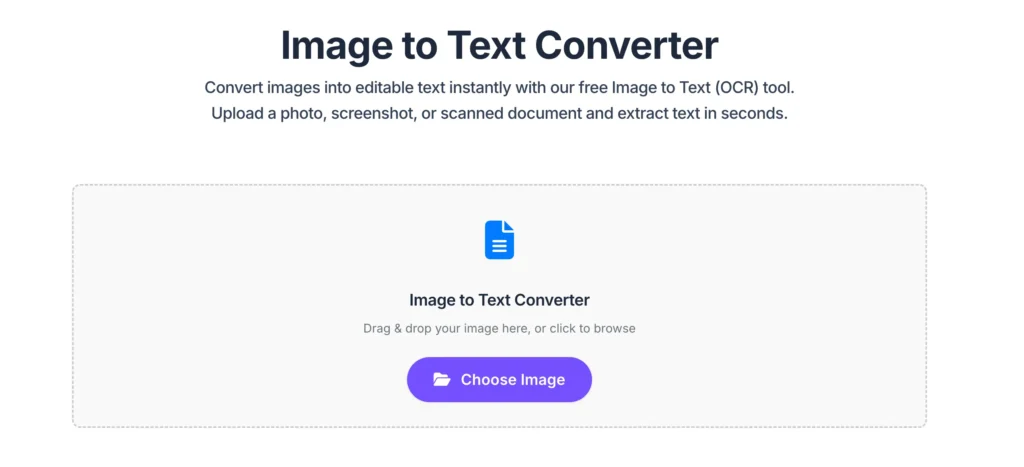
Upload or drag and drop your image file. The tool supports common formats such as JPG and PNG, including screenshots and scanned documents.
Step 2: Extract Text from the Image
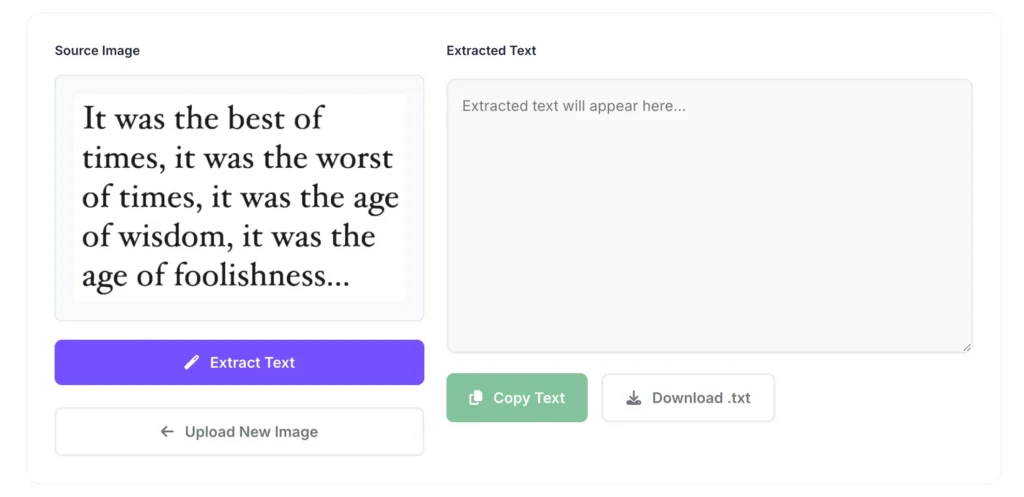
Click the Extract Text button. The OCR engine scans the image and recognizes the text automatically.
Step 3: Copy or Download the Text
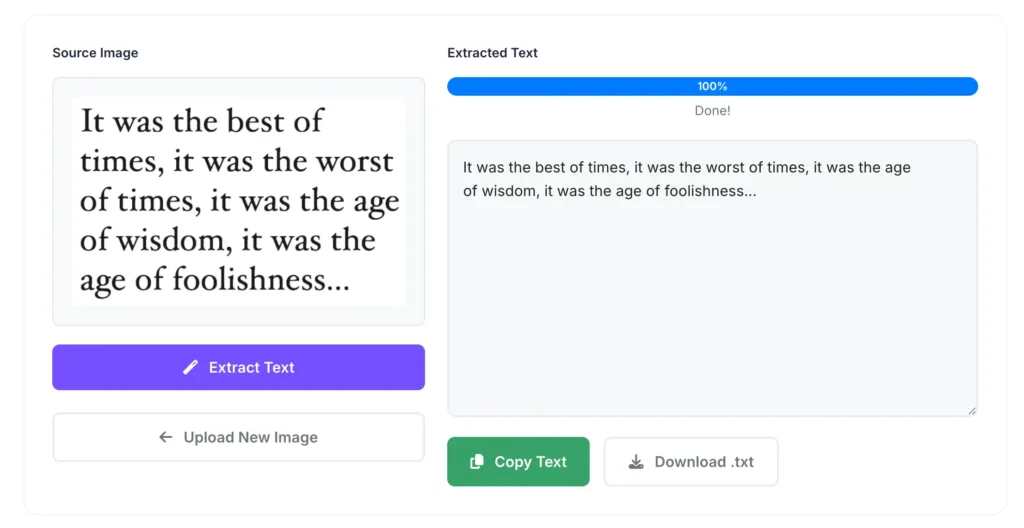
Once the extraction is complete, the text appears in an editable box. You can copy it instantly or download it as a .txt file.
No technical knowledge is required — the entire process takes just a few seconds.
Final Thoughts
An Image to Text converter is a must-have tool for anyone who frequently works with images containing text. Whether you’re digitizing documents, copying text from screenshots, or avoiding manual typing, OCR makes the task faster and easier.
The Pixellize Image to Text Converter offers a clean, accurate, and privacy-focused solution with no limits and no setup. If you’re looking for a reliable way to convert images into text, Pixellize is the right choice.

Pixellize
We're Pixellize Team, a group of digital creators and developers who are passionate about developing free online tools that can be easily utilized by everyone. We also share tips on working smarter and faster!
Related Post
Online PDF Reader – View and Read PDFs Instantly
In today’s fast-moving digital world, PDFs are everywhere — from office documents and study materials to invoices, resumes, and eBooks....
Pixellize
February 22, 2026
5 Min Read
How to Rotate PDF Pages Online (Step-by-Step Guide)
PDF files are great for sharing documents, but sometimes pages don’t appear the way they should. You might open a...
Pixellize
January 4, 2026
4 Min Read
How to Resize Signature Images to 20KB & 50KB
If you have ever tried to fill out a government job application, a visa form, or a college registration, you’ve...
Pixellize
December 31, 2025
4 Min Read